class="post-inner post post-307922 type-post status-publish format-standard has-post-thumbnail hentry category-top1dev-no1dev category-top1index-top1list-top1world category-top1labs-no1labs category-top1vietnam-no1vietnam tag-no1dev tag-no1labs tag-top1dev tag-top1labs tag-lam tag-messagebox tag-no1vietnam tag-quen tag-top1index tag-top1list tag-top1vietnam tag-trong tag-voi" id="post-307922">
Chắc hẳn MessageBox đã quá quen thuộc với chúng ta khi sử dụng hệ điều hành Windows. Ngôn ngữ C# và nền tảng .NET Framework đã hỗ trợ rất nhiều trong việc sử dụng MessageBox. Bài viết này sẽ hướng dẫn các bạn làm quen với MessageBox trong Windows Form.
MessageBox là một lớp (class) nằm trong System.Windows.Forms có một phương thức Show() để hiển thị thông báo. Có rất nhiều kiểu thông báo, bạn có thể điều chỉnh nội dung thông báo, tiêu đề, các nút OK-Cancel, biểu tượng, v.v…
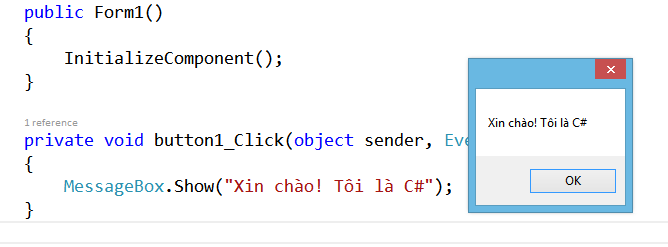
MessageBox.Show("Xin chào! Tôi là C#");
Đây là kiểu thông báo đơn giản nhất, chỉ có nội dung và nút OK, chưa bao gồm biểu tượng, tiêu đề, v.v..
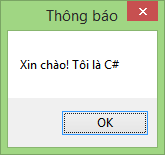
Để có tiêu đề ta thêm 1 tham số chuỗi truyền vào phương thức như sau:
MessageBox.Show("Xin chào! Tôi là C#","Thông báo");
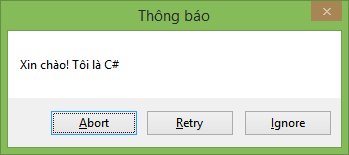
Để cài đặt nút bấm, ta cũng thêm 1 tham số kiểu enum là MessageBoxButtons.<loại nút>. Các loại nút có sẵn bao gồm AbortRetryIgnore, OK, OKCancel, RetryCancel, YesNo, YesNoCancel. Ví dụ:
MessageBox.Show("Xin chào! Tôi là C#", "Thông báo",
                                MessageBoxButtons.AbortRetryIgnore);
Để xử lý các sự kiện khi nhấn vào các nút này mình sẽ hướng dẫn bên dưới.
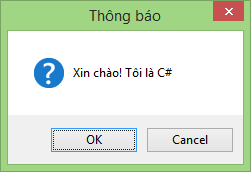
Để thêm vào icon ta thêm tham số kiểu enum là MessageBoxIcon.<loại icon>, có nhiều loại nhưng phổ biến là Warning (tam giác vàng có dấu chấm than), Error (hình tròn đỏ có chữ X), Information (hình tròn xanh lam có chữ i), Question (hình tròn lam có dấu chấm hỏi). Ví dụ:
MessageBox.Show("Xin chào! Tôi là C#", "Thông báo",
               MessageBoxButtons.OKCancel, MessageBoxIcon.Question);
Còn rất nhiều tùy chọn khác các bạn có thể tự khám phá. Còn bây giờ mình sẽ hướng dẫn các bạn xử lý sự kiện khi click vào một button trên MessageBox.
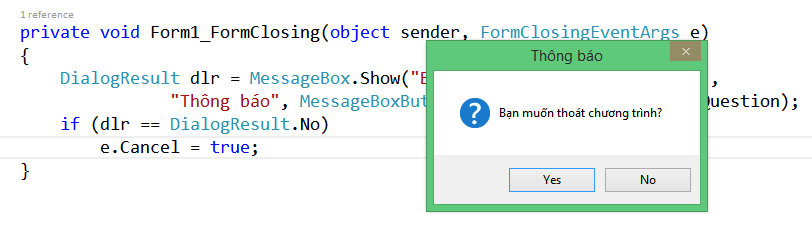
Giả sử bạn có một Form, và bạn muốn khi người dùng nhấp vào nút Close trên thanh tiêu đề thì sẽ có thông báo hỏi người dùng có muốn thoát chương trình. Nếu người dùng chọn Yes, chương trình sẽ kết thúc, chọn No sẽ không tắt chương trình.
Ta xử lý sự kiện FormClosing, tức là một Form đang đóng lại (nháy vào nút X hoặc lệnh this.Close(),…).
Bạn sẽ dùng một biến kiểu DialogResult để lưu lại kết quả trả về của phương thức MessageBox.Show()
DialogResult dlr = MessageBox.Show("Bạn muốn thoát chương trình?",
      "Thông báo", MessageBoxButtons.YesNo, MessageBoxIcon.Question);
Đến lúc này ta chỉ cần xét giá trị của biến dlr để rẽ nhánh thôi. Vì Form đang đóng nên nếu người dùng nhấn No thì sẽ hoãn hành động đóng lại, tham số sự kiện của FormClosing là e nên ta thực hiện như sau:
DialogResult dlr = MessageBox.Show("Bạn muốn thoát chương trình?",
     "Thông báo", MessageBoxButtons.YesNo, MessageBoxIcon.Question);
if (dlr == DialogResult.No) e.Cancel = true;
Với những giới thiệu sơ lược, các bạn đã có thể nắm được cách sử dụng cơ bản về MessageBox trong Windows Form.
Notice: Trying to get property 'post_type' of non-object in
/www/wwwroot/hdd-vatly/re_mysql.top1index-top1list.com/wp-content/mu-plugins/post-media-only.php on line
74




![[👨💻🇻🇳] Làm quen với MessageBox trong C#](https://top1brand.top1index-top1list.com/wp-content/uploads/sites/22/sites/3/2023/11/1699696486_522_1.png)
![[👨💻🇻🇳] Làm quen với MessageBox trong C#](https://top1brand.top1index-top1list.com/wp-content/uploads/sites/22/2021/07/con-tro-trong-c-la-gi.jpg)
![Buy such a robot as a bodyguard.#robot [🤖🇻🇳]](https://top1brand.top1index-top1list.com/wp-content/themes/rehub-theme/images/default/noimage_336_220.png)